How to Change Tax Code Online and Get the Correct HMRC Code Applied to Your Pay?

Last Updated: 03 November 2026
If the tax code on your payslip is wrong, you can usually correct it online by updating the information HM Revenue and Customs (HMRC) holds about your employment, pension, estimated income, company benefits or expenses.
You do not normally choose a replacement tax code yourself. Instead, you correct the information HMRC is using.
HMRC then works out whether your tax code needs to change and sends the new code to both you and your employer or pension provider.
For the current 2026/27 tax year, HMRC’s Check Your Income Tax service allows taxpayers to view their tax code, estimated employment and pension income, update income details and report changes that could affect their PAYE code.
Can You Change Your Tax Code Online?
Yes. The quickest way to correct an incorrect PAYE tax code is normally through HMRC’s online Income Tax service.
A tax code is used by an employer or pension provider to calculate how much Income Tax should be deducted from wages or pension income. HMRC tells the employer or pension provider which code to use.
Before requesting a change, it is worth establishing whether the code genuinely does not reflect your circumstances.
For example, an employee may see a different code after changing jobs, receiving a company benefit or starting a second source of income without anything actually being wrong.
Understanding whether your tax code is correct can help identify whether HMRC’s records need changing or whether the code already reflects your tax position.
You may need to update HMRC if:
- Your Estimated Income Is Wrong: HMRC may be using a salary figure that is too high or too low.
- An Old Job Is Still Showing: A previous employment may not have been closed correctly.
- A New Job Is Missing: HMRC may not yet have received the latest employment details.
- Pension Income Is Incorrect: A pension could be missing or recorded at the wrong amount.
- A Taxable Benefit Has Changed: A company car or another taxable workplace benefit may have started or ended.
- Employment Expenses Have Changed: Eligible tax-relief expenses may affect the calculation.
- You Have More Than One Job: The available Personal Allowance may need to be allocated differently.
Changing the information behind the code is usually more important than focusing only on the combination of numbers and letters shown on the payslip.
Why Might Your Tax Code Need Changing?
HMRC changes tax codes when someone needs to pay a different amount of Income Tax.
This can happen following a change in income or circumstances, including starting another job or pension, receiving taxable state benefits, changes to State Pension income, workplace benefits, Marriage Allowance, employment expenses or tax owed from an earlier period.
Common situations include:
- Starting A New Job: HMRC may initially have incomplete information about previous earnings and tax.
- Having Two Jobs: Your Personal Allowance may need to be allocated between different sources of PAYE income.
- Receiving A Pension: Pension income can change the way allowances are used.
- Getting A Company Car: Taxable benefits can reduce the amount of tax-free income included in the code.
- Stopping A Company Benefit: HMRC may need to remove the value of a benefit that is no longer received.
- Claiming Tax Relief: Eligible employment expenses can affect your available tax-free amount.
- Receiving More Untaxed Income: Savings interest or other taxable income can sometimes affect PAYE coding.
- Previous Underpayment: HMRC may use a tax code to collect tax owed from an earlier period.
Not every change to a tax code means there is a problem. The important question is whether the income, allowances, benefits and deductions HMRC has used are accurate.
What Do You Need Before Changing Your Tax Code Online?
Having the correct information ready makes it easier to identify what HMRC needs to update.
You may need:
- HMRC Sign-In Details: You need to sign in to use the online Income Tax service.
- National Insurance Number: This can be needed when creating or verifying an account.
- Photo Identification: HMRC may ask you to prove your identity using documents such as a passport or driving licence.
- Latest Payslip: This shows the code currently being used by payroll.
- P45: Particularly important if you have recently changed jobs.
- P60: Useful for checking previous annual pay and tax.
- Estimated Annual Income: Check whether HMRC’s estimate matches what you expect to earn.
- Pension Details: Include taxable private or workplace pension income.
- Company Benefit Details: Check whether benefits recorded by HMRC are still current.
- Employment Expense Information: Relevant if you claim tax relief for work-related expenses.
HMRC’s current-year service covers 6 April 2026 to 5 April 2027 and allows users to update income from jobs and pensions as well as employer or pension-provider details.
How to Change Your Tax Code Online Step by Step?
The online process is mainly about correcting HMRC’s records rather than manually selecting another tax code.
Check Your Employment, Pension And Income Details
Sign in to HMRC’s Check Your Income Tax service and review the information shown for the current tax year.
Pay particular attention to:
- Current employments
- Previous employments
- Estimated annual earnings
- Pension income
- Company benefits
- Employment expenses
HMRC specifically advises taxpayers who believe their code is wrong to check their employment, pension, estimated taxable income, company benefit and expense information.
Update Any Incorrect Or Missing Information
Correct anything that no longer reflects your actual circumstances.
For example, you may need to report that:
- You Have Left A Job: An old employer should no longer be treated as an active employer.
- Your Income Estimate Has Changed: HMRC’s estimated annual earnings may no longer be realistic.
- You Have Started Another Job: Additional PAYE income may affect how allowances are allocated.
- A Benefit Has Ended: A company car or medical benefit may still appear in the calculation.
- Pension Income Has Changed: The amount HMRC expects you to receive may be inaccurate.
- You Have Eligible Expenses: Employment expenses can sometimes increase the tax relief included in the code.
If you have recently left a job and did not receive a P45, HMRC recommends asking the previous employer for one because it can help update your record.
Submit The Changes To HMRC
After correcting the relevant information, submit the update through the service.
HMRC then determines whether the change affects your tax code. Not every update will necessarily result in a different code.
If a new code is needed, HMRC sends it to you and the employer or pension provider responsible for deducting PAYE.
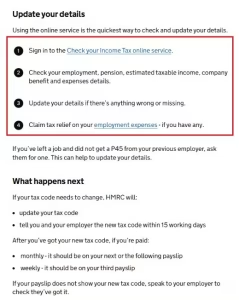
HMRC’s official guidance shows the online steps for checking employment, pension, taxable income, company benefits and expenses before correcting a tax code.
How Long Does It Take to Completely Change Your Tax Code?
The complete process has two stages.
First, HMRC has to process the corrected information and issue a new code. Second, the employer or pension provider has to receive that code and apply it through payroll.
HMRC says that where a tax code needs changing, it will tell the taxpayer and employer about the new code within 15 working days.
The code may not therefore appear on your wages immediately.
| Stage | Typical Position |
| Information Submitted | Update sent through HMRC’s service |
| HMRC Changes Code | Within 15 working days where a new code is required |
| Monthly Payroll | New code should normally appear on the next or following payslip |
| Weekly Payroll | New code should normally appear on the third payslip |
| Recent New Job | It can take up to 35 days for HMRC to receive and process employment information |
HMRC says a monthly-paid employee should normally see the new code on the next or following payslip, while a weekly-paid employee should normally see it by the third payslip.
A code shown as 1257L CUMUL indicates that payroll is operating the standard 1257L code cumulatively, taking account of earnings and tax already paid during the tax year.
This can become relevant after a temporary non-cumulative code has been replaced.
What Can Cause a Tax Code Change to Fail or Be Delayed?
A tax code update may not produce the expected result if HMRC does not have enough accurate information to calculate the person’s PAYE position.
Several issues can slow the process or cause the code to remain incorrect.
Incorrect Or Missing Information
HMRC states that wrong tax codes are usually caused by missing or incorrect information.
Possible problems include:
- Incorrect Income Estimate: HMRC may still be using an outdated salary figure.
- Old Employment Still Active: A former job could remain on the record.
- New Employment Missing: HMRC may not yet have payroll information from the new employer.
- Missing Pension Details: Taxable pension income may not have been included.
- Incorrect Benefit Information: A company benefit may remain after it has ended.
- Missing Previous Pay: Pay and tax from an earlier employer may not yet have transferred.
- Incorrect Personal Details: Employment or pension-provider information may need updating.
Providing accurate information is particularly important for someone with several jobs or pensions because HMRC has to decide where allowances should be allocated.
Employer Or Payroll Has Not Applied the New Code
Sometimes HMRC has already changed the code, but the new number has not yet appeared on the payslip.
Employers use tax codes to calculate PAYE and should update payroll records when HMRC sends a new coding notification.
If the tax code shown in your HMRC account is different from the one on your payslip, HMRC’s current guidance is to speak to your employer.
This means there can be a difference between HMRC changing the tax code and payroll actually using it.
You Have Recently Started A New Job
A recent job change is one of the most common reasons for a delay.
HMRC advises someone who has just started a job to wait 35 days for new income information to reach its systems before contacting HMRC about an incorrect tax code.
Giving the new employer a P45 can help because it provides details about previous pay and tax.
What Happens After HMRC Changes Your Tax Code?
Once HMRC issues a revised code, it sends the information to the relevant employer or pension provider.
Payroll then uses the new code to calculate future Income Tax.
The process generally follows this order:
- You correct HMRC’s information.
- HMRC reviews the updated details.
- HMRC determines whether the tax code must change.
- HMRC sends the new code to you and payroll.
- Payroll applies the code.
- The revised code appears on your payslip.
- Previous overpayments or underpayments may be adjusted where appropriate.
Where HMRC changes someone from a non-cumulative code to a normal cumulative arrangement, payroll can take earlier pay and tax into account.
The difference between a cumulative code and an emergency basis can significantly affect deductions during the tax year.
It is therefore worth checking the first few payslips after a change rather than assuming the process is complete as soon as HMRC issues the code.
How to Change an Emergency Tax Code Online?
An emergency tax code normally appears when HMRC or an employer does not yet have all the information needed to establish the taxpayer’s full PAYE position.
Common emergency markers include:
- W1: Week 1 basis
- M1: Month 1 basis
- X: Emergency treatment where pay dates vary
- NONCUM: Non-cumulative treatment shown by some payroll software
HMRC explains that emergency tax calculates tax using the current week’s or month’s income rather than taking the complete tax year into account.
Someone placed on an emergency tax code after starting work may temporarily pay a different amount of tax because previous earnings, tax deductions and unused allowances are not being considered in the normal cumulative way.
If you have a P45 from your previous employer, give it to your new employer. HMRC says this provides previous income and tax information and can help remove the emergency code.
The ordinary 1257L code is not automatically an emergency code. Emergency treatment generally applies when it is accompanied by W1, M1 or X, which is why the distinction between standard 1257L and 1257L emergency tax treatment matters when reading a payslip.
HMRC says updating an emergency code following a new job can take up to 35 days from the date employment starts.
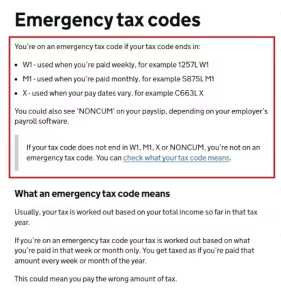
HMRC’s emergency tax-code guidance confirms the W1, M1, X and NONCUM markers and explains that updating a code after starting a new job can take up to 35 days.
What If Your New Tax Code Is Still Wrong or Not Showing?
Start by comparing the code HMRC holds with the one printed on your payslip.
HMRC recommends checking the code in the online Income Tax service or HMRC app and comparing it with payroll.
If the two codes are different, the employee should speak to the employer.
If the HMRC code itself still appears incorrect, review:
- Current Employment: Make sure the correct job is active.
- Previous Employment: Check that old jobs have ended.
- Estimated Income: Make sure HMRC is not using an unrealistic figure.
- Pension Income: Check all relevant pensions are recorded properly.
- Taxable Benefits: Remove benefits that are no longer received.
- Employment Expenses: Make sure eligible reliefs are recorded correctly.
If you have only recently started work, allow the 35-day period before escalating the issue.
If the new HMRC code has already been issued but payroll continues to show the old one beyond the expected period, contact your employer and ask whether the latest coding notification has been received.
Will Changing Your Tax Code Result in a Tax Refund?
Changing a tax code can result in a refund if the previous code caused too much Income Tax to be deducted.
HMRC first checks whether it has all the necessary income information. If it does, it calculates the difference between the tax already paid and the amount that should have been paid.
Where an in-year refund is due, HMRC may ask the employer or pension provider to repay the difference through payroll when the new tax code is used.
For example, someone who spent part of the year on an emergency Month 1 code before being moved onto the correct cumulative code may find that earlier overpaid tax is adjusted through a later wage payment.
A refund is not guaranteed simply because the code changes.
If the previous code caused too little tax to be deducted, HMRC can instead adjust the code to recover the outstanding amount.
HMRC may collect that tax over one or more tax years where possible.
The purpose of changing the code is therefore to bring PAYE deductions closer to the correct tax position, whether that means reducing deductions, refunding an overpayment or collecting tax that remains due.
Conclusion
The most effective way to change a tax code online is to correct the information HMRC is using rather than attempting to choose a new code yourself.
Check employment details, pension income, estimated earnings, taxable benefits and employment expenses carefully.
Once the information is accurate, HMRC can decide whether the PAYE code needs changing and send the revised code to your employer or pension provider.
Where a change is required, HMRC says it will normally issue the new code within 15 working days.
The complete process may take longer because payroll still has to apply it, with monthly employees generally seeing the new code on the next or following payslip and weekly employees by their third payslip.
If nothing changes, check whether HMRC has complete information, whether you are still within the 35-day period after starting a job and whether your employer has actually received the latest coding notice.
FAQs
Can I Change My Tax Code Online Myself?
Yes. You can update information affecting your PAYE code through HMRC’s Check Your Income Tax service. HMRC then determines whether a different tax code is required.
How Long Does It Take to Completely Change a Tax Code?
HMRC says it will normally notify you and your employer of a new code within 15 working days. Payroll timing means the code may appear on the next or following monthly payslip or by the third weekly payslip.
Why Has HMRC Not Changed My Tax Code?
HMRC may still be waiting for employment information or may hold incorrect income, pension or benefit details. If you have recently started a job, allow up to 35 days for the information to reach HMRC.
Can My Employer Change My Tax Code?
Your employer normally has to use the tax code supplied through PAYE rather than choosing a new one independently. Payroll can check whether it has received HMRC’s latest coding notification.
Can I Change an Emergency Tax Code Online?
You can correct the information affecting the code through HMRC’s online service. If the emergency code follows a new job, providing a P45 to your employer can also help HMRC establish the correct position.
Will I Automatically Get a Refund When My Tax Code Changes?
Not necessarily. A refund may be made if the previous code caused an overpayment and HMRC has enough income information to calculate it, but an underpayment could instead result in additional tax being collected.
What Should I Do If My Tax Code Is Correct on HMRC but Wrong on My Payslip?
Speak to your employer or payroll department. HMRC advises doing this when the code in its online service differs from the code being used on your payslip.
What is your reaction?