
6 Advantages of Managed WordPress Cloud Hosting by SeekaHost via websitehosting.app (a Real Reviewer’s Take)

I’ve spent years testing WordPress hosting platforms. Some genuinely deserved the marketing behind them. Most didn’t. When SeekaHost’s WordPress cloud hosting via websitehosting.app landed on my radar, I did what I do with every new host: put real sites on it, watched what happened, and compared it to what I would have paid elsewhere.
This is my honest write up. Six advantages that actually matter, who should be using this kind of hosting in the first place, and where it lands against the big names in the market.
What is WordPress Cloud Hosting?
Before the advantages, some clarity, because the phrase “cloud hosting” has been thoroughly abused in this market.
Traditional shared hosting puts your WordPress site on a single server alongside hundreds of other sites. If one of them has a traffic spike, everyone slows down. It’s cheap because you’re sharing.
Cloud hosting puts your site on a network of virtualised servers. Resources are allocated to your site when it needs them. When traffic spikes, the platform doesn’t fold, it responds. Your site stays fast under load.
Managed WordPress cloud hosting adds one more layer: the platform handles the WordPress specific work for you. Security patches, caching configuration, PHP updates, SSL provisioning, backups. You log in, you write, your site works.
Not every host that calls itself managed WordPress cloud hosting is genuinely all three. Some are managed cloud but leave the WordPress bits to you. Some are managed WordPress on shared infrastructure that isn’t really cloud.
SeekaHost via websitehosting.app is one of the few platforms genuinely offering all three at a price a normal WordPress site owner can actually afford.
Who Should Use Managed WordPress Cloud Hosting?
Not everyone needs it. If you’re running a hobby blog with 100 visitors a month, a basic shared plan is fine. But managed WordPress cloud hosting starts making real sense when you fit one of these profiles:
- Serious bloggers. You publish regularly, your traffic is growing, and downtime costs you readers and ad revenue.
- Publishing platforms and content sites. Magazine style sites, niche publishers, and content driven businesses need the consistency of cloud infrastructure with the simplicity of managed WordPress.
- Multi site WordPress bloggers. If you’re running three, five, or ten WordPress sites, you don’t want to log into a different panel for each one.
- Agencies managing client sites. Delivering fast, reliable client sites without paying enterprise prices is exactly the sweet spot cloud hosting is designed for.
- Small business owners. If your website generates leads or sales, downtime and slow load times cost you real money every hour they persist.
If any of those describe you, keep reading.
About the Platform
SeekaHost’s team built websitehosting.app specifically to bring managed WordPress cloud hosting within reach of the audiences above.
The dedicated WordPress cloud hosting page on SeekaHost walks through the technical specs and the plan options in more detail. What I want to focus on here is what I actually saw when I put the platform through its paces.
Six advantages that stood out.
1. Purpose Built for WordPress Performance
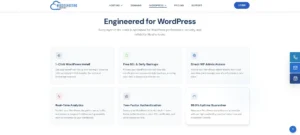
Most cloud hosts run a generic LAMP or LEMP stack that happens to run WordPress. websitehosting.app runs WordPress tuned server images, which means the caching layer, PHP configuration, and static file handling are already dialled in for WordPress workloads on day one.
Add NVMe SSD storage across every plan, and the test sites I ran were loading fast without me touching a single performance plugin. That’s rare. Most hosts require three plugins and half a weekend before a site starts loading properly.
Fernando Raymond, the founder of SeekaHost, has written up the deeper infrastructure detail in Superfast Managed Cloud WordPress Hosting on websitehosting.app if you want the full technical picture.
2. Fully Managed Support So You Can Focus on Content
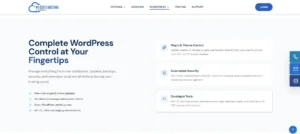
Here’s where “managed” is worth defining more carefully. On websitehosting.app, the platform handles:
- SSL provisioning and renewal, automatically and included in your plan
- WordPress security patches applied at the platform level
- Server security and OS updates handled by the operations team
- Caching configured out of the box
- Backups running without you touching them
- PHP version management handled by the platform
Practically, this means you never touch a server console. You never file a certificate renewal request. You never spend an hour on a Sunday evening figuring out why a caching plugin is fighting with your host’s built in caching.
Support runs an AI assisted first response layer for common questions and a human team for the real ones.
Response times were fast in my testing, and the humans were technically competent when I needed them, which is not the norm across this market.
3. Multi Site Management From One Dashboard
This is the advantage that agencies and multi site bloggers care about most, and it’s where SeekaHost’s platform genuinely pulls ahead.
Every WordPress site you run lives in the same portal. Same login. Same file manager. Same billing.
If you’re managing three client sites, or ten sites for your own portfolio, you’re not juggling three different control panels and three sets of DNS records.
You can also register the domains for those sites in the same portal, which is something most cloud WordPress hosts don’t offer at all.
Kinsta doesn’t sell domains. WP Engine doesn’t. Cloudways doesn’t. On websitehosting.app, the domain, the hosting, the SSL, and the files all live under one login.
For an agency, that’s a real time saver. For a multi site blogger, it’s the difference between managing your sites and managing your hosting.
4. Better Pricing Than Kinsta, WP Engine, WPX, and Cloudways
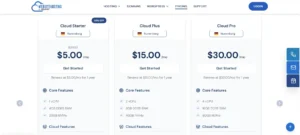
Let’s talk numbers, because this is where the platform genuinely shifts the maths for most WordPress site owners.
Kinsta starts at around $35 a month for one site with a 25,000 visit cap. Email hosting is extra. Overage fees apply if you exceed your visit ceiling.
WP Engine starts near $25 to $30 a month for one site, with phone support locked behind their $55 tier and overage billing when you exceed the visit cap on your plan.
WPX Hosting starts around $20 a month for their entry business plan and is priced above the shared WordPress plans on websitehosting.app despite offering fewer of the integrated portal features.
Cloudways looks cheap on the sticker, but you’re picking your droplet size, sizing your PHP workers, and doing your own scaling. Once configured for real WordPress workloads, monthly bills climb fast, and you’re doing the sysadmin work yourself.
websitehosting.app starts significantly below all of the above for shared WordPress plans, and its cloud VPS tiers stay within reach of a growing content business rather than jumping to enterprise pricing.
Fernando has broken this down in more detail in Better Managed WordPress Hosting in 2026 with Cheaper Prices by SeekaHost. The short version: for the vast majority of WordPress site owners, you’re overpaying elsewhere.
5. Three Data Centre Regions for Global Audiences
You can host in Nuremberg, East Virginia, or London. For a blogger or agency serving a specific region, hosting close to your audience saves real milliseconds on every request.
That translates to better Core Web Vitals scores, better Google rankings, and a better user experience for the reader who came to your site to actually read.
For agencies with clients in different regions, being able to spin up client sites in whichever region suits their audience without opening accounts on multiple platforms is a genuine operational win.
Your UK clients live in London, your US clients live in East Virginia, your European clients live in Nuremberg. All from the same dashboard.
6. Seamless Scaling From Shared WordPress to Cloud VPS
The last advantage is one I noticed while I was testing. On most hosts, “growing out” of your plan means migrating to a different platform, or at least a different account.
On websitehosting.app, you start on a shared WordPress plan for a new site and move to a cloud VPS tier from the same portal when traffic outgrows the shared environment.
Same login. Same file manager. Same domain. Same billing. Nothing to rebuild.
For a growing content site, that’s a big deal. For an agency onboarding a new client that’s about to launch a campaign and might spike traffic overnight, being able to slide them up to cloud VPS with one click is a serious operational advantage.
Where This Platform Genuinely Shines?
Based on my testing, here’s who I’d point at websitehosting.app first.
Publishing platforms and content sites. Magazine style sites, niche publications, and content heavy blogs benefit most from the combination of cloud infrastructure, WordPress specific tuning, and pricing that doesn’t punish you for succeeding.
Multi site WordPress bloggers. If you’re running multiple sites (and I know several bloggers who are up to twenty), the single portal, shared billing, and integrated domain management save more time than any other single feature on the platform.
Agencies managing client sites. Being able to onboard a new client, register their domain, launch their WordPress site, and hand them a working setup within an hour is the operational reality of running an agency in 2026. websitehosting.app is one of the few platforms that supports that end to end.
Growing bloggers and business site owners. If your site is on the way up and you know you’ll outgrow shared hosting within the year, starting here means you never have to migrate. Same portal, higher tier, no rebuild.
The verdict
Managed WordPress cloud hosting has been artificially expensive for years because the market was dominated by three or four premium hosts and everyone else was priced against them.
websitehosting.app breaks that pattern by delivering genuinely fast, genuinely managed, cloud based WordPress hosting at prices that make sense for real bloggers, publishers, and agencies.
The multi site management, the integrated domain registration, the three data centre regions, and the seamless scaling from shared to cloud VPS are the features that made it stick for me during testing.
If you’re currently paying Kinsta or WP Engine prices for a site that isn’t yet an enterprise, or fighting Cloudways to configure your own server when you’d rather be publishing, spend an hour inside portal.websitehosting.app or read through the SeekaHost WordPress cloud hosting page and set up a test site.
For the audience this platform is built for, the answer is going to be obvious.
What is your reaction?